Showing posts with label tools. Show all posts

Friday, February 15, 2008

Text-Focused Wiki = Contextualized Discussion = Better Online Learning

I came across an interesting article in First Monday this morning via Distance Educator presenting research on the increased engagement and focus elicited by a wiki solution for online discussion over a more typical threaded discussion forum.

Student Engagement In Distance Learning Environments: A Comparison Of Threaded Discussion Forums And Text-focused Wikis
The purpose of this study was to improve the quality of students' online discussion of assigned readings in an online course. To improve the focus, depth, and connectedness of online discussion, the first author designed a text-focused Wiki that simultaneously displayed the assigned reading and students' comments side by side in adjacent columns. In the text-focused Wiki, students were able to read the assigned text in the left column and type their comments or questions in the right column adjacent to the sentence or passage that sparked their interest. In post-participation surveys, data were gathered about students' experiences in the text-focused Wiki and prior experiences in threaded discussion forums. Students reported more focus, depth, flow, idea generation, and enjoyment in the text-focused Wiki.

Basically, the wiki solution/interface set the course readings and discussion space in a side-by-side format allowing comments and discussion to be far more contextualized and specificas they referred to reaings adjacent to the comments. Of course in a typical threaded discussion, I'd have my students do the readings, and then discuss them after the fact...usually from memory. Comments are always more vague, and it takes some work getting learners (myself included) to cite specific examples or ideas from the readings.

While I wasn't at all impressed with the layout and interface of their particular solution, I like the concept, and have heard of similar solutions which do not employ wikis, but do allow for embedded discussions within online documents. Many of these are simpler annotation tools, while others provide for a bit more in the way online discussion and dialogue. I've blogged a couple times recently about Viddler's feature which allows me and my students to engage in dialogue within the video file. I just like it when tool support the powerful principle of contexualized feedback--Where discussion and dialogue can occur very near to the actual experience or digital artifacts (video, text, images etc.) being studied. I've seen in my own teaching and learning experiences how dialogue and feedback is richer and more helpful when provided within context.

If you encountered other examples of learner-friendly annotation, contextualized feedback and discussion solutions, please share them here.
-Joel G.

Wednesday, January 23, 2008

Ramblings (to self) on purposeful technology use...

Some reading tonight on the folly of teachers building websites spawned some thoughts about the importance of having a purpose for using any given technology or assigning any learning activity. The post talks about how teachers are so often sent to professional development workshops to learn web development or how to build web pages. Too often, however, teachers fail to have a solid purpose for using websites, and their web pages go unused or are never updated remaining eternally "under construction". David Jakes writes :

Teacher Web pages are the HyperCard stacks of 2008.
I agree, but I would edit this to read:
Teacher blogs of today are the teacher Web pages of the turn of the century, which were the HyperCard stacks of the 1990s.
The notion of using technology for a purpose is not new, but was brought up again for me tonight as I read Jakes's post and by questions yesterday from a couple of my students who asked me what we 'd be doing in class with the blogs. I had real no answer and proceeded to remove some vestiges of the "blog" language I had initially tried to shoehorn into my syllabus.

I had been trying to find a way to use blogs in my online course--I'd been trying really hard! It just didn't make sense yet for my course. I believe there are great ways to use blogs (and wikis and podcasts too)...but not for my class this semester. This has frustrated me because as an learning technologist, I really want to use blogs in a class to gain some first-hand experience and best practice knowledge with using blogs in a social/group learning environment. But it is not to be this semester, and I'm glad I didn't take the bait and put the proverbial cart before the horse.

With regard to building websites, my students (who are largely teachers) used to create websites in my class too. I don't address that anymore, but have not yet found the ideal substitute for posting small instructional, media-rich nuggets. Wikis are likely the solution, as they provide a more customizable environment than a blog, but wikis are built for collaboration, and to use them just as modern-day-WYSIWYG web page builders seems less than ideal.

I've not yet found the optimal solution. I think I ideally need an "Bliki" or a "Wlog"--an easy-to-use web publishing environment that has elements of both blogs and wikis. Maybe this is a job for Drupal or Movable Type 4....better yet, our focus in general should first be in helping teachers/instructors understand why, where, and for what purpose to use a given technology, and only then on providing them with knowledge on how to use them and mini successfful experiences in using them.
Well, I'm rambling at this point, but wanted to capture these thoughts as I continue to mull this dilemma over.
-Joel G.

Tuesday, August 14, 2007

Jing & Springdoo: a couple helpful little tools.

Ok, so I bookmarked these tools (Jing and Springdoo) some time ago, with the intent of looking into them more closely down the road when I had more time (as I am prone to do) . The last couple days I actually got around to investigating them more closely...and now am wondering how I lasted so long without them. This is definitely NOT a case of the-tool-creating-the-need. These are simple, low threshold capabilities/services/tools that I have wanted and been looking for... for ages--speaking in terms of I-time (Internet time).

Jing is a screen capture tool (picture or video, with or without audio). I can't count the times that I've wanted to be able to SHOW my students how to do something, or solve a problem, but have not had a SIMPLE way of facilitating this form of communication. Screencapture tools of various flavors have been around forever, but have often been tied to specific media players or platforms, and were cumbersome to create, share and view. My classes have always attracted mac and PC users, and making a single file to make everyone happy was usually more work than it was worth. Jing simplifies this process tremendously for me. Now when students have a question...I can either record a quick response rather than spending my time on the phone describing the solution, or on IM/email typing out the answers in text and attaching screen grabs. When the next student comes along with the same question, I can gently direct them to the same screencapute viewable online (hosted on screencast.com). Again, nothing new here technologically speaking, but it is the EASE with which I can now record, narrate and share a screencast that is unparalleled and has solved a long-standing challenge I've struggled with.

Springdoo is a service/application that allows you to EASILY record audio (or video) from a cell phone or webpage, giving you embed tags or links to put the audio in your blog, email, webpage, IM etc. The output, like many services out there, is also flash media. I like their service (SpringBlog) because compared to others I found it easier to use, and the player, when embedded, was less annoying or ad-driven than some of the others can be. Interestingly, the also have a pocasting feature (SpringCast) and embeddable code to host your podcast and allow audio/video replies to your original post. Posts (and the replies) can be easily subscribed to and also sent to phones (UK only right now) and iTunes or other podcast managers. I was a bit disappointed to see that the replies lacked linkage back to the sender's profile--and did not include the senders profile pic. I was however, pleased to see the audio thread embed so nicely in my LMS or VLE.
Note, like many sites, free hosting space is limited, so if you're going to get into this heavily, consider paying for the pro accounts, or be sure you can delete a semesters work (to free up space) before you start over for your next class...and yes, these sites require yet another login.

For a couple similar and promising tools for more threaded audio/video discussions, consider Chinswing or Viddler (i.e. think language instruction) or even VoiceThread (i.e. think portfolio and project review)--each takes a different approach to creating media-rich discussion in the online environment.

Let me know how you think you might use these tools.
-JG

Tuesday, July 31, 2007

Simple tools--removing technology from the picture


I read a post this evening from a blog I follow. The post simply marked a 3-yr blogging milestone for the author (Cole Camplese). I thought that was in itself fairly impressive to me since I've only been blogging more seriously for a few months. Upon reviewing my first post, I was surprised to see, however, that this month will mark my 2nd year blogging...where I stopped deleting my old test posts or posts I felt were dumb (I set up my Blogger account over 4 years ago on Feb 22, 2003)

Cole made a point about how blogging (setting up an account and publishing a thought) was so beautifully simple--a three step process. It made me think back to when I started. I recall vividly feeling some of the same thoughts! No html, no ftp, no transferring a web page, no hassle, no need to make it pretty (nice starter templates provided)--just type and publish! Simplicity isn't enough, and it wasn't until this year that I felt I had something to say and actually started blogging more regularly. I continue to seek this simplicity when designing tools, consulting with faculty and in teaching my students. I'm delighted to see more and more tools (many of the web 2.0 variety) that reflect the same simplicity (and then I got a movable type blogging account...grrrr).

A recent favorite of mine is Viddler (http://www.viddler.com/) . Since 1996, I've been building, designing or just dreaming about such tools--think YouTube with rich media annotation and commenting tie-able to specific frames within the video. I teach video classes, so this has been a long-desired tool--a cross-platform way to share and talk about instructional video...in an uncomplicated way. The pieces have existed for years, but have been tied to Quicktime or another format only, or to a mac or PC only--I can go on and on about the limitations for end-users. Viddler has succeeded in taking the technology out of the picture for most users, allowing us to concentrate on communication around and with the media. I can't wait to use the tool the next time I teach my class (of course, RSS and tagging come standard).

Yet as simple as tools are (seem to be), I was starkly reminded this week of a parallel reality for too many. A colleague (teacher) was trying to learn how to podcast this week (on a PC). Audacity (http://audacity.sourceforge.net/) was downloaded and installed easily enough for her, but then getting the necessary Lame mp3 codec (http://en.wikipedia.org/wiki/LAME) turned out to be quite a bear. Similarly, so many (non-mp3) podcasts fail to open on PCs even with iTunes installed. There are (no good!) reasons and work-arounds, but it can be so frustrating for the un-initiated who are trying so hard to learn new skills, and or those of us trying to support their initiation them and help them have a sucessful experience.

Despite these lingering challenges, I remain encouraged and optimistic about the simplicity of many new tools. The underlying technology for creating, sharing and communicating around content is, to my great pleasure, being removed from the picture...now if they'd just remain free, stay in business, and not be so successful in attracting the basest of what humanity can produce. I know, I ask too much.
-Joel G.

Monday, July 02, 2007

Conducting a Ed-Tech vanity search

A couple years ago , I began a making a list of things I've experienced in life that help shape who I am today. (I'm sure as an avoidance tactic to keep from working on my graduate schoolwork)

I share here the "education" and "technology" -related piece of my still-growing list...(I do NOT claim to be an expert on most of this by any means). These are simply technologies I have used, or things I have experienced. It is a fun activity--a form of vanity search, tantamount to Googling your brain for the search term: me*technology*education--and I'd heartily recommend the exercise (especially if you've got a looming deadline or project to put off).

You'll likely amaze yourself with all you've done in life so far, how privileged you are, and with how quickly (educational) technology changes! I was/and still am!

___________________________________
THE LIST

Education (school andteaching experiences)
-I have taught and team-taught university courses (online, face-to-face)
-I have taken asynchronous correspondence courses (print, web)
-Participated in synchronous Distance Learning Tele-lectures (satellite, Internet hi-band, web-based--PictureTel, Vtel)
-I have attended schools in Israel/Palestine, Holland, and the USA
-I have attended a Montessori school, have experienced homeschool, private school, public school, Catholic kindergarten, Anglican Church school, Private University (Brigham Young University)
-2 years as a teaching missionary in Switzerland, Germany and Austria (German language)
-I have attended two intensive, immersion language training programs
-I have had formal music instruction in Trumpet, Tuba, Guitar, Contra-base Clarinet, Piano and Organ.
-I have been trained in scouting, and likewise trained young scouters
-I have guest lectured in university courses, conducted faculty training workshops
-I have had numerous church teaching opportunities (young adult and youth Sunday school)
-I completed an associates degree (photography), B.A. (Film), and Masters (Technology Education), I am currently finishing a Ph.D. (Instructional Systems, PSU)
-I have attended numerous professional development and HR workshops (Covey Leadership, Stanford Institute Project Management)
-I have attended and presented at professional conferences (state and national)
-I have visited a one-room Amish school, and observing teaching and instructional materials.

Technology & Media (non-computer related)
-I have dealt with the following film formats: 8mm, Super 8, 16mm, 35mm , 70mm film cameras (loaded, threaded, cleaned, filmed, edited)
-I have dealt with the following film projectors: 8mm, 16mm film, 35mm projectors (splicing/editing, playback, threading)
-I have played, recorded and edited with the following video formats: Betamax, VHS, SVHS, 3/4 "U-matic, 1", Betacam SP, video8, Hi8, minidv, DVCpro, DVD-video
-I have videotaped with many professional camcorders (Sony, JVC, Panasonic, Ikegami, digital (dsp), and analog)
-I have used, edited and masterered numerous videodiscs (levels 1 and 2), Recordable Videodisc (CRV) Sony, Pioneer.
-I have used the shortllived CD-I (interactive) format from Pioneer.
-I have worked with the following photography media: transparencies, negative, darkroom, 35mm, Medium format (Hasselblad, Mamiya) Large format (4x5, 8x10) Color, B&W
-I am a trained Steadicam operator (used with 16mm film, DVC-pro, Betacam and MiniDV cameras)
-I have used film strips (usually with cassette tape-manual. The advance-on-tone variety)
-Used slide projectors and developed multi-projector (up to 3) presentations (with synchronized audio and control tracks) (This format was considered the original "multimedia")
-Have worked on numerous film production crews (Documentary, Television and Theatrical release)
-Am familiar with and have used a host of professional audio equipment (microphones, speakers, headphones, mixers, routers and patch bays): Audio Technica, Shure, Sennheiser, Telex, Pro-tools, MOTU, Yamaha, Motorola, GLM, Denon, Peavey, Mackie, Sony, AKG, JBL, Tascam, Nakamichi, SierraVideo Systems, Kramer, Marantz.
-Photography (Aerial (sea-plane, helicopter), Terrestrial (in, on, under many moving vehicles) & Underwater)
-Chalk (dust free, regular, natural) Chalkboards (green, black, brown, handheld slates, wall mounted, painted)
-Whiteboards (electronic, copyable, projected, pressure sensitive, networked.)
-I have used and/or recorded with: Audio cassette recorders, 8 track player, Audio-CD , DAT, Minidisc, adat, Record (vinyl) turntables-phonographs (33, 45, 78 speeds) single and multi-platter versions
-I have experiences with reel to reel audio (splicing, playback, threading)
-Flip charts (handheld, easel mounted, Post-it variety)
-I have used the following environment controllers in "electronic" classrooms (Crestron, AMP)

Technology and Media (computer-related)
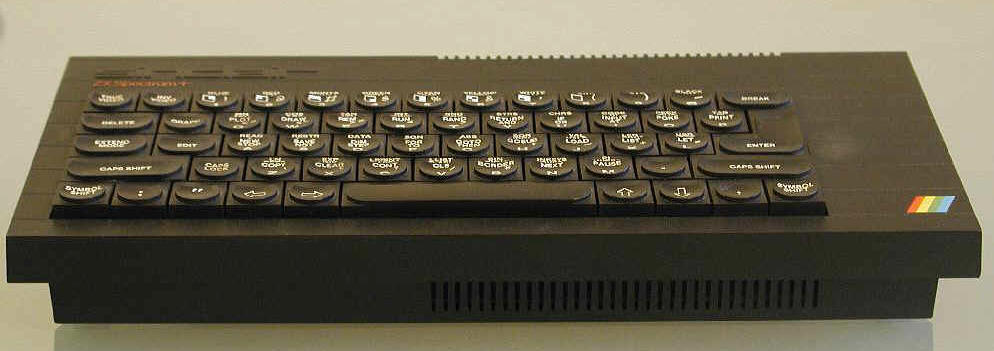
-Computer platforms/OS (Sinclair, Atari 800, Commodore 64, Apple, Mac--OSX, Wintel--Dos, Win 3.1, Win 9x, Win 2k, ME, XP) -Digital media formats (Mpeg 1,2,4,7, avi, wav, aiff, au, wmv, rm, ra, mov, mp3, swf)
-Group response systems (Onetouch, Fleetwood, Group Systems)
-Electronic slides (Presentations, Powerpoint, Astound)
-Synchronous Distance Learning Tele-lectures (satellite, web-based, Internet hi-band--PictureTel, Vtel)
-Video streaming, (broadcast and Interactive w/chat)--(QT, Flash, Real, Windows media, Vivo, Vxtreme, Geo)
-DVD-Video, DV-ROM-web hybrid
-Authoring systems (Authorware, Toolbook, Flash) Multimedia CD
-Avatars, VRML (3d spaces)
-I have helped develop PDA courses (Palm, Pocket PC, Trivantis)
-Massively Multiplayer Online Role-Playing Game (MMORPG, MMOG) (There, Second Life, World of Warcraft)
-I have accounts in the following Social Networtk sites: Facebook, Linked-in, Orkut, Friendster (chose to stay out of MySpace)
-3D rooms (BYU, PSU "caves")
-Variable speed Playback VSP (Enounce)
-Whiteboard, electronic, copyable, projected, pressure sensitive, networked.
-Synchronized media (Mpeg-4, Real, Windows Media, Flash, Director, QT)
-Computer Supported Collaboration technologies (Elluminate, Netmeeting, Centra, Interwise, Webex, HorizonLive-Wimba, Placeware, Paltalk, Groove, Atinav, iChat, and many others)
-Simulations (virtual chemlab)
-Media search (Pictron, Virage, Excaliber, Google video, MediaSite)
-Asset management and digital library products (Bulldog, MediaSite, Jaguar, Content DM, Hyperion, TeleScope, Silver Platter
-Non Linear Editors (NLE) (D/Vision, Avid, Premiere, Toaster, Play, FAST, Final Cut, iMovie, Windows MovieMaker)
-Immersive, networked gaming (World of Warcraft, Delta Force, Doom, Wolfenstein 3D, Pod racer), (Other: Command & Conquer, Age of Empires)
-I have used the following data backup systems: SyQuest (various capacities), Quantum DLT 4000-8000, Iomega
-I am familiar with, and have had (to attempt) to design for SCORM, IMS, AICC compliance (learning objects, media objects)
-I have used the following LMS, CMS and LCMS products: Blackboard, WebCT, Angel, Moodle, NYU Online, Lectora, Topclass, Learningspace, FirstClass, Click2Learn, Avaltus, Playback Media, Skillsoft, Tegrity and others

-I have maintained and/or used Blogs, Wikis, Podcasts, regular html websites

-I have used RSS feeds to distribute and aggragate online content.

-I have posted and shared photos and video online (Flickr, Picasaweb, Googlevideo, YouTube)

Other Technology
-Global Positioning System receiver (GPSr) devices--handheld and automotive from (Lowrance, Garmin, Magellan & Cobra)
-Gestetner, stat machine, mimeograph (still remember the smell of purple acetone), ditto machine, photocopiers
-Word Processor (Word, (Corel)Wordperfect, Apple/Claris works, Star Office Writer)
-Overhead projector, LCD projector
-Post-it sheets (various colors and sizes, easel pads)
-Chalk (dust free, regular, natural) Chalkboards (green, black, brown, handheld slates, wall mounted, painted)

-Typewriter (manual and electric front strikes, and "IBM selectric", with and without correction strips, two-color ribbons)
-I've used Carbon copy paper
-Telex machine, facsimile machine
-PDAs (Palm OS, Pocket PC)

Other Experiences
-Facility design (Sound design, studio design, school design, classroom design)
-I am a Christian, Father, Husband, Son, Grandson, Brother, Neighbor, Friend, Student, Foreigner (Canadian), Teacher, learner.
-White, Male
-I scuba dive (not in years), ski (not very well), snowboard (ok)

-I have attended most of the following (inter)national conferences more than once: NAB (National Association of Broadcasters), IBC (International Broadcasting Convention), TeleCon, Online Learning, ALN (Sloan-C), AERA, AECT, EdMedia, SALT, IDLCON (International Distance Learning Conference) now E-Learning, TechED. _______________________________________

I imagine many of you have had similarly rich experiences with technology and education. The list continues to be added to, and I still need to come up with a better categorization scheme...Any ideas?

-Joel Galbraith

Thursday, May 24, 2007

Tuttle writes an interesting post on YouTube tagging.
_______________
YouTube Stuff- Tagging it so Others Can Find it
When you post your YouTube video, please make sure to tag it with the major tag of Education; the subject area (Social Studies); the critical aspect of the standard (contributions of various groups); the specifics (Irish building the Erie Canal); and the general grade levels (4-11). Add any other tags that would help educators and students to find it such as Canal Songs, and Westward expansion, and New York State.
The better you tag it, the better other teachers and students can benefit from your efforts and your students’ learning.
We can make YouTube (and other YouTube like places) an educational repository of all our educational videos that are made by teachers and students for teachers and students.
So what tags have you used with your YouTube instructional videos?
___________________

Another interesting link is: http://www.teachertube.com

-Joel G.

Creative Commons License
This work is licensed under a Creative Commons Attribution-Noncommercial-Share Alike 3.0 License.